
Consistent AI Video Starts With a 3D Set: Introducing Filmustage Studio
Filmustage Studio builds a 3D set for every scene of your script, then generates the film from it. Same room, same faces, same light, in every shot.


Filmustage Studio builds a 3D set for every scene of your script, places the cameras and the lights, and generates the film from it. Same room, same faces, same light, in every shot, for as long as the scene runs.
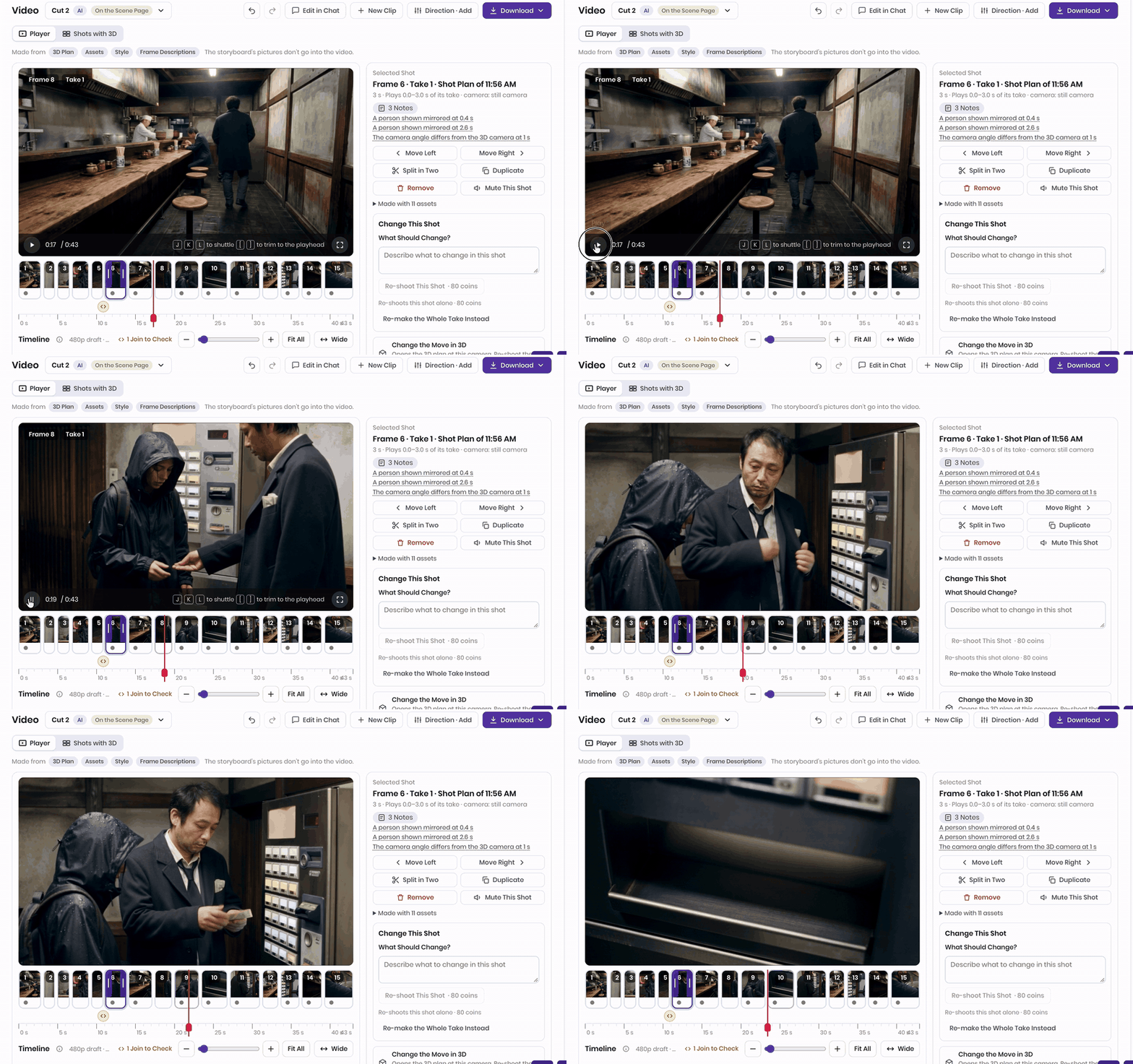
✅ What's newFilmustage Studio — a new tab in every project: assets, a 3D plan per scene, storyboard frames and scene video, generated from the breakdown3D plan — set, props, characters, cameras and lights placed automatically; editable; continuity checked before renderingAssets — characters, costumes, props and environments made once from the tags or your photos, reused in every sceneScene video — shots generated from the plan and cut per scene, any length, MP4 export
Every video model can give you one beautiful eight-second shot. Ask for the reverse angle and the room changes. The window moves, the jacket turns a different colour, your lead ages ten years between the wide and the close-up. Creators have a name for it now: character drift. Filmmakers have had a name for it for a century: a continuity error.
The tools fix it with patches. Reference images hold a face for a shot or two. “Director modes” string six shots together. Studios with money skip the patches and do what they have always done: build the set in 3D first, block the cameras, then render. Previs houses like The Third Floor start that work months, sometimes a year, before principal photography, turning out up to 150 shots a day on a big show (ProVideo Coalition). It works, and it costs a department.
The pressure to find a cheaper route is not theoretical. Netflix’s co-CEO Ted Sarandos told investors that the first generative-AI shot in a Netflix original, a building collapse in El Eternauta, was finished “10 times faster” than traditional VFX would have allowed and “just wouldn’t have been feasible for a show in that budget” (Interesting Engineering). Runway’s 2026 AI Media Report describes an independent studio whose full-film animatics are already 80% generative video (Runway). And among independent documentary filmmakers, 47% plan to use generative AI for previsualization, more than for any creative task except research and writing proposals (International Documentary Association, n=146).
Filmustage Studio does the 3D step for you. Upload a script, or describe an idea, and Filmustage Studio breaks it into scenes, creates the characters, props and locations as assets, builds a 3D set for each scene with cameras and lights already placed, renders the storyboard frames from those cameras, and then generates the video shot by shot from the same plan. The painting stays on the right wall because there is a wall. Your lead keeps her face because she is an asset, not a prompt.
Previs is a geometry problem, which is why it has always been 3D
Ask a previs editor what the job is and you will not hear “pretty pictures”. You will hear lenses. At The Third Floor, “the cameras, lenses and cranes are precisely the ones that are going to be used on the real set”; a change from a 50 mm to a 20 mm is a big decision, and from 20 mm to 27 mm can reframe the action. Each shot is a couple of seconds long, a feature can carry 60 minutes of previs with temp sound, and the thing directors ask for most is close-ups (ProVideo Coalition). Tech-vis then writes down the dolly move, the lens and the camera height for every shot so the crew can build it.
That is also why it is expensive. MPC’s previs on The Jungle Book “started out as a three-week job and turned into six months” (Empire). On Rampage, one unplanned gorilla close-up would have added about $60,000 to the VFX budget; previs exists to catch that before the shoot (ProVideo Coalition). Previs catches it because it is built on geometry: a set with real dimensions, cameras with real focal lengths, actors at real eyelines. Continuity, coverage and the 180° line are not aesthetic choices. They are properties of that geometry.
Runway’s own guide to AI previs is honest about this. Generative models, it says, cover the creative half of previs, “does this scene work”, but not the technical half of “blocking against real geometry, rigging, and precise camera data”, and generated camera moves should be read as statements of intent, not rig plans (Runway). That is the gap: AI previs tools generate pictures without a set, so they inherit every continuity problem of prompt-to-video. The market is growing fast regardless: AI video generation is an $847 million business in 2026, forecast to reach $3.35 billion by 2034, with media and entertainment its largest segment at 23.9% (Fortune Business Insights). Most of that money is spent on clips.
Three ways people make AI video today, and where each one breaks
If you have tried to make more than a clip, you have used one of these.
1. Prompt-to-video. Runway, Kling, Veo, Seedance, Sora: type a description, get five to fifteen seconds. Each shot starts from nothing, so each shot invents its own room. Practitioners who test sequences report the same thing: the subject may hold, but “the look quietly drifts”, the key light warms, the haze thins, and the cut feels like a different day (AI Pro Cinematography). Good for a mood piece. Not a film.
2. References and “elements”. Runway Gen-4.5 World Consistency, Kling 3.0 Elements (two to four reference images per character) and Director Mode, Luma’s character reference, Veo’s ingredients. You upload images of a character and the model keeps the face. This is real progress, and it is where most 2026 guides stop. It anchors identity, not geometry: the same reviewers who praise Runway’s character consistency report that “the look quietly drifts”, and Kling’s Director Mode caps a pass at six shots (AI Pro Cinematography, Elser). Costumes change colour, props become other props, and long runs degrade, so people generate in fifteen-second blocks and grade them to match in post. Adobe’s 2026 survey of 16,000 creators puts a number on the cleanup: 57% say their AI output typically needs moderate or extensive editing before it ships (Adobe).
3. Blender plus a video model. The professional answer. Block the scene in Blender with simple shapes, animate the camera, render a greybox and depth passes, then drive the model with them through ControlNet or a video reference (Flick’s Blender guide). Because every shot looks at the same geometry, the room stops moving. The price is the pipeline: a 3D artist, a ComfyUI graph, roughly 24 GB of GPU memory, and setup time for every shot. The studios that have budget for it also have a previs department. Most productions have neither.
The third approach is right. It is just too expensive to be the default. That is the gap Filmustage Studio fills.
What Filmustage Studio does differently: a 3D set for every scene
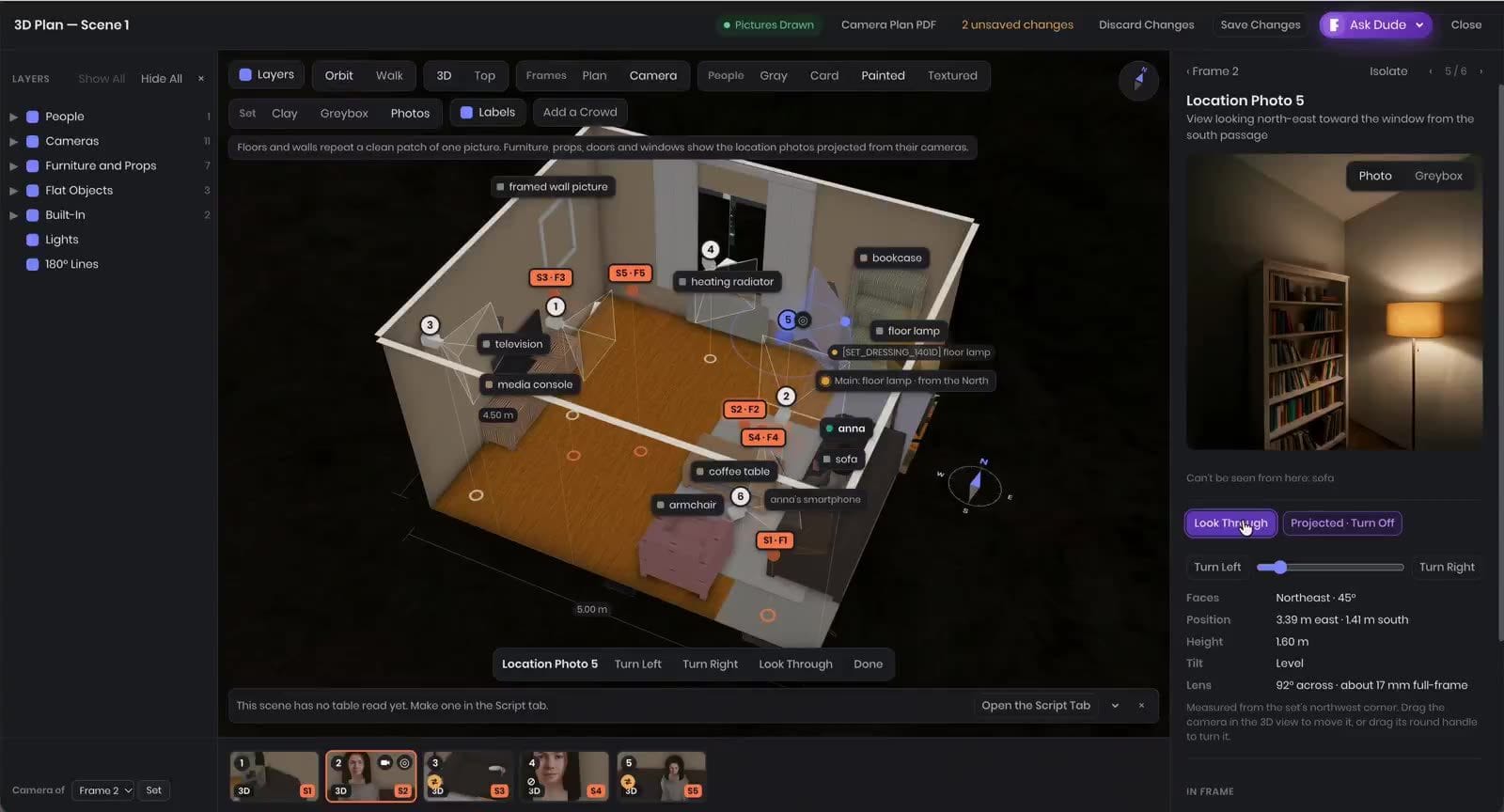
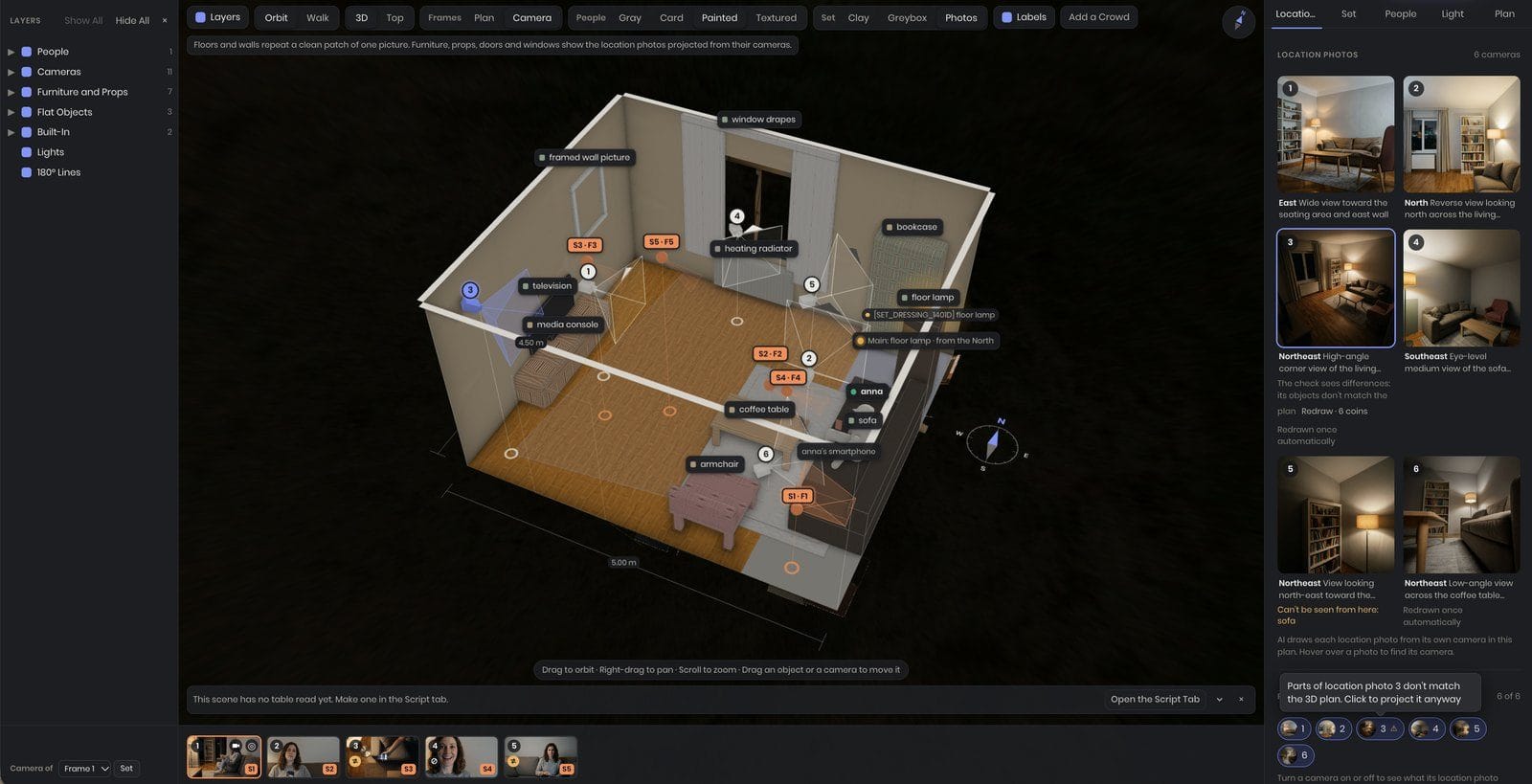
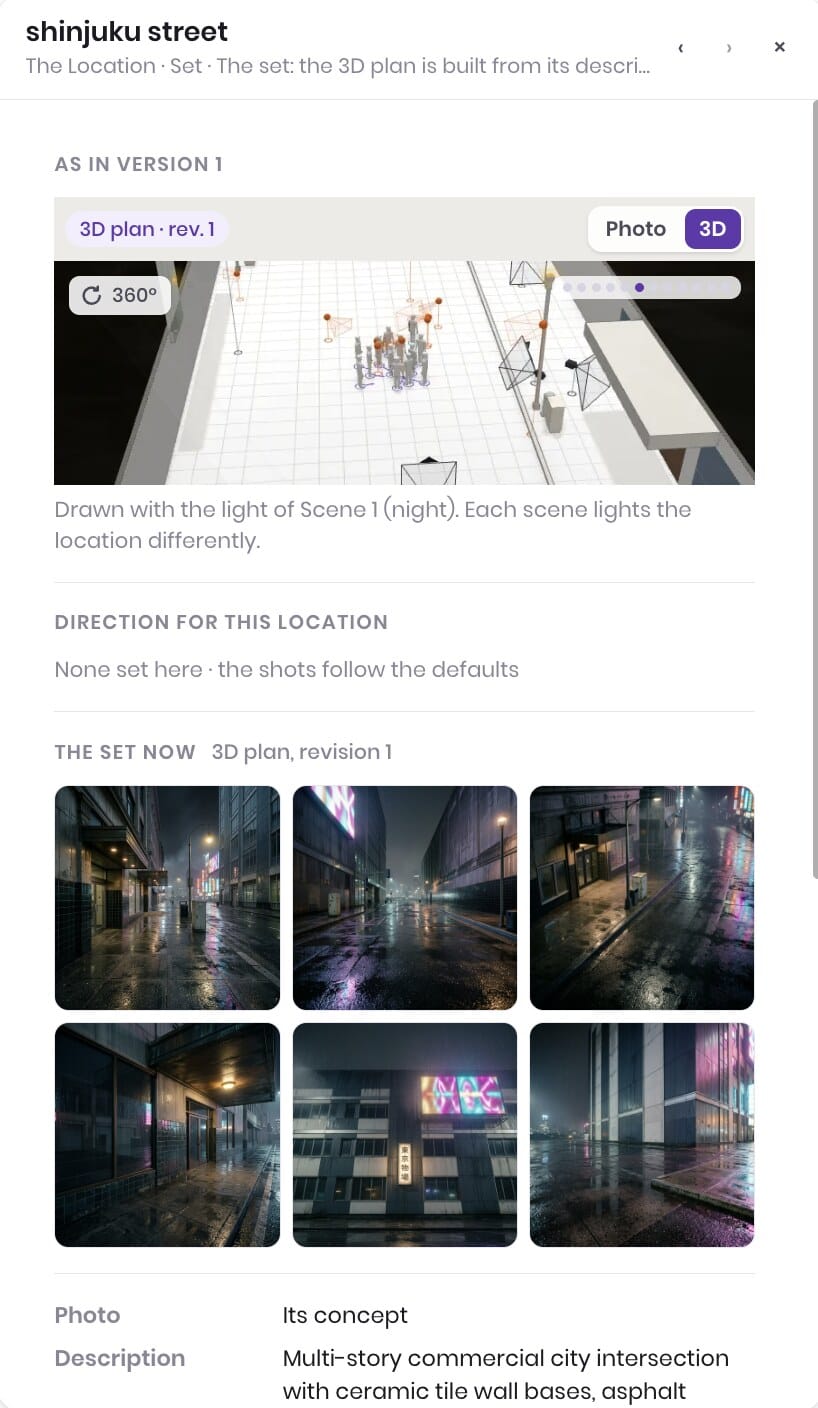
Filmustage Studio starts where Filmustage has always started, the script breakdown. Every scene is already tagged with its cast, props, locations, costumes and time of day, so Filmustage Studio knows who is in the room, what is on the table and whether it is night. From that it builds, per scene, a real 3D set: walls, floor, furniture, the props from the breakdown, a stand-in for each character, a key light with a direction, and a set of cameras placed for the coverage a DP would ask for: establishing, over-the-shoulder, close-ups, inserts.
Three things follow from that, and they are the whole point.
Every shot looks at the same world. Frames and video are rendered from cameras in the plan, so the reverse angle is the same street from the other side, not a new street. Location photos are projected onto the set from the camera that took them, which is why the bookcase is on the same wall in the wide and in the close-up.
Characters and props are assets, not prompts. Maya is created once, from the breakdown or from a photo you upload, with her face, build and wardrobe. She is then placed in the set and seen by every camera. The same is true of the backpack, the rain jacket, the billboard. Attach your own photo and the film is shot around you.
Continuity is checked before anything is rendered. Because the plan is geometry, Filmustage Studio can tell when a camera crosses the 180° line, when a prop is not visible from a frame that needs it, or when a location photo does not match the set, and flags it in the plan rather than in the render.
You never have to open the 3D plan. It is generated and the defaults are sensible. But it is there: move a camera, change a lens from 24 mm to 85 mm, switch the key from the floor lamp to moonlight, and the frames and the video follow.
And because the video is generated shot by shot from the plan and assembled per scene, length is set by the script, not by the model. A scene can run a minute or an hour. Three hundred scenes become a film.
From script to scene, step by step
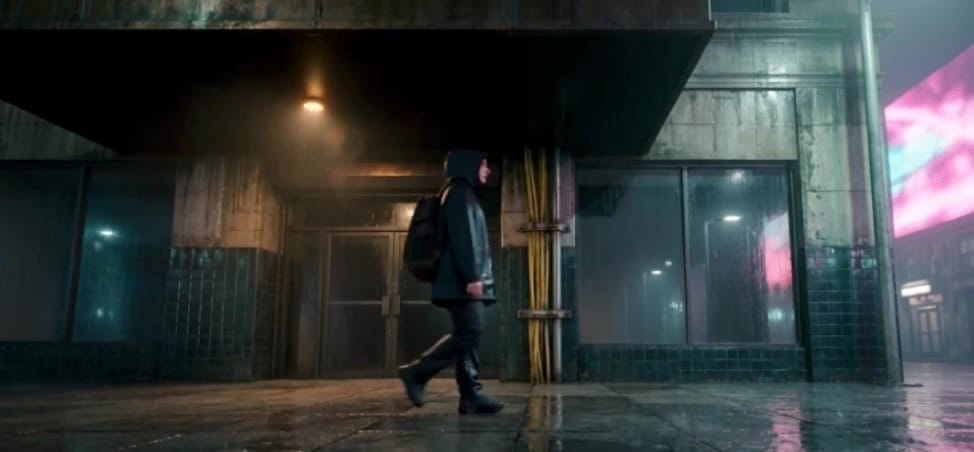
Here is the Shinjuku scene from our beta test, start to finish. The screenshots are from the product, not mock-ups.
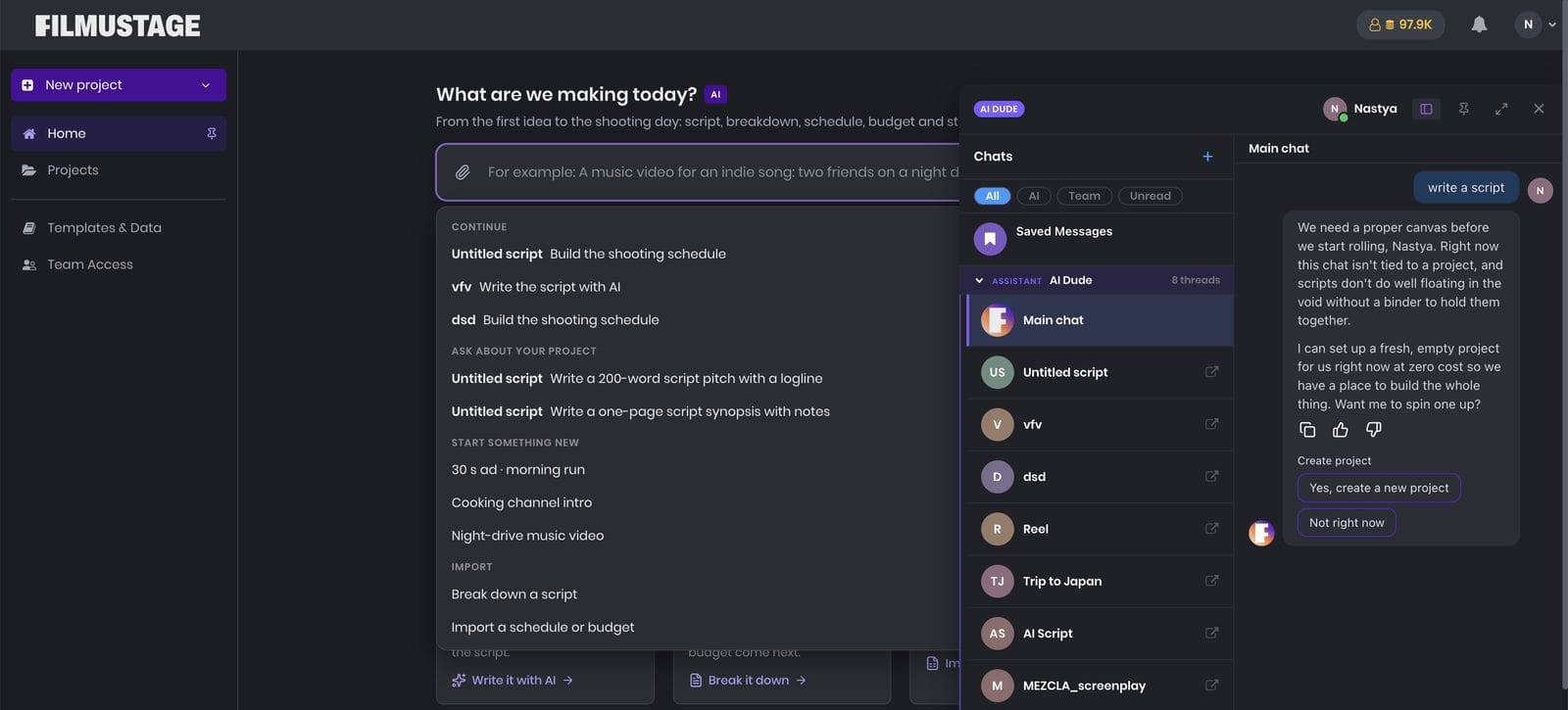
Step 1. Script or idea. Upload a screenplay (FDX, PDF or DOCX) or start from a sentence. The script agent asks for genre, format and ending, and drafts scene by scene. It already knows nine project types: commercial, music video, short, feature, series episode, documentary, educational video, video blog, and your own.
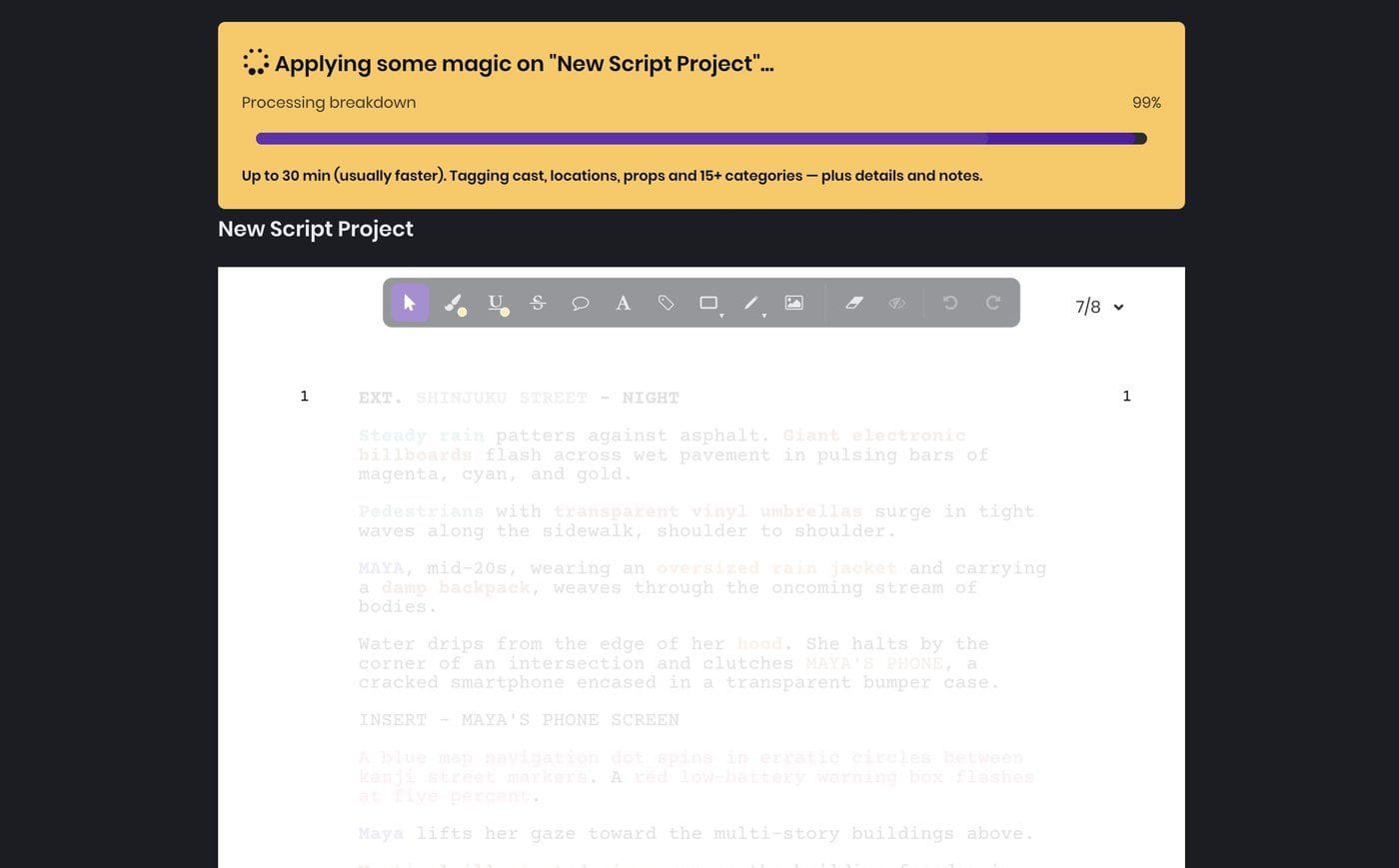
Step 2. Breakdown. Filmustage tags every scene: cast, extras, props, set dressing, VFX, sound, costumes, set. This is the same breakdown that drives your schedule and budget, and now it is the brief for every asset and every frame.
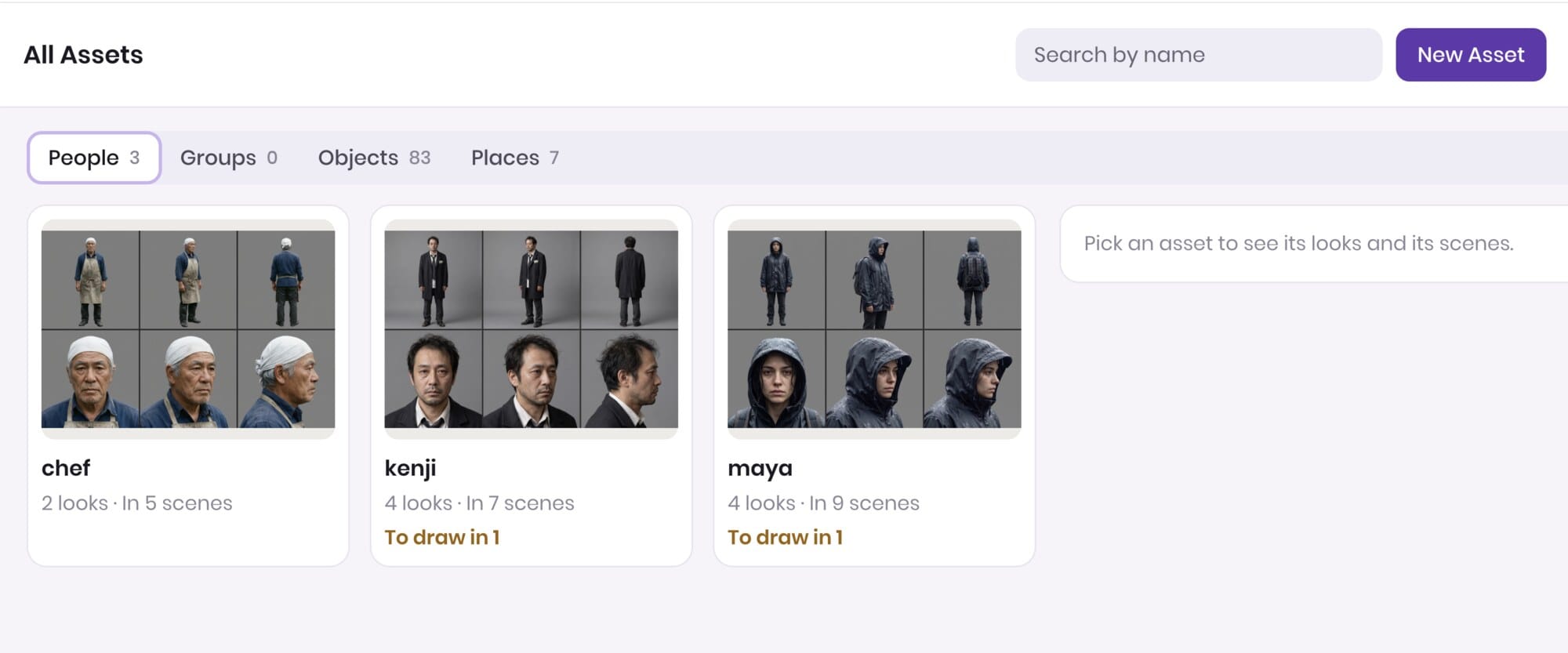
Step 3. Assets. Filmustage Studio generates the characters, costumes, props and environments from the tags, or from photos you attach. Maya, the rain jacket, the backpack, the electronic billboards, the cracked phone. Each one is made once and reused everywhere.
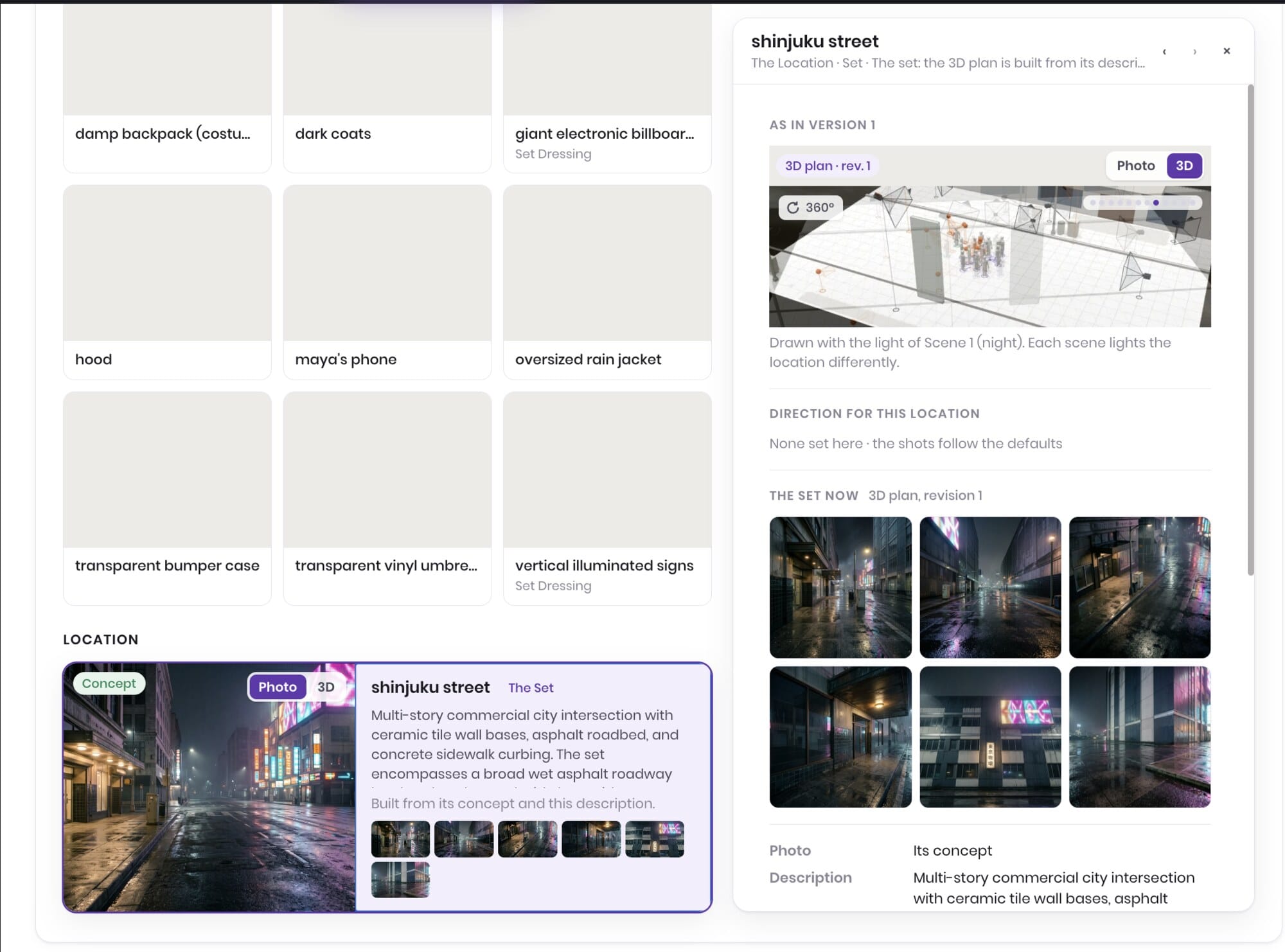
Step 4. 3D plan. The set is built, the lights and cameras are placed. Open it if you want to; drag a camera, change a lens, re-light the room. Or don’t.
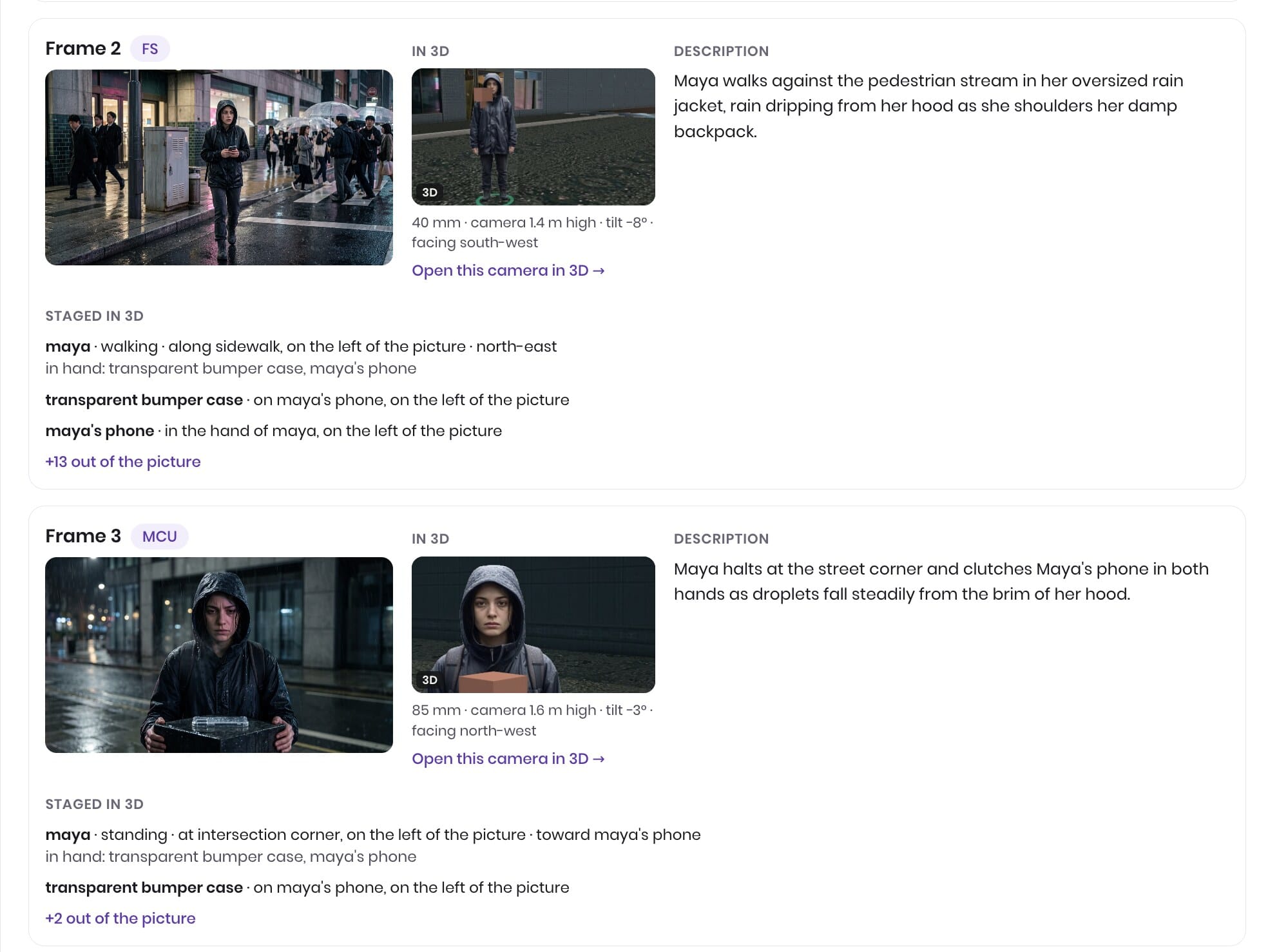
Step 5. Frames. The storyboard is rendered from each camera in the plan, one picture per frame, with shot size, lens and lighting on the card. Eleven frames of Maya, one street, one jacket.
Step 6. Video. Shots are generated from the plan and cut into the scene in the built-in editor. Trim, reorder, re-shoot a single shot with a note (“she looks up before the cut”), and export MP4. Our scene is eleven shots and 29 seconds; the next one can be ten minutes.
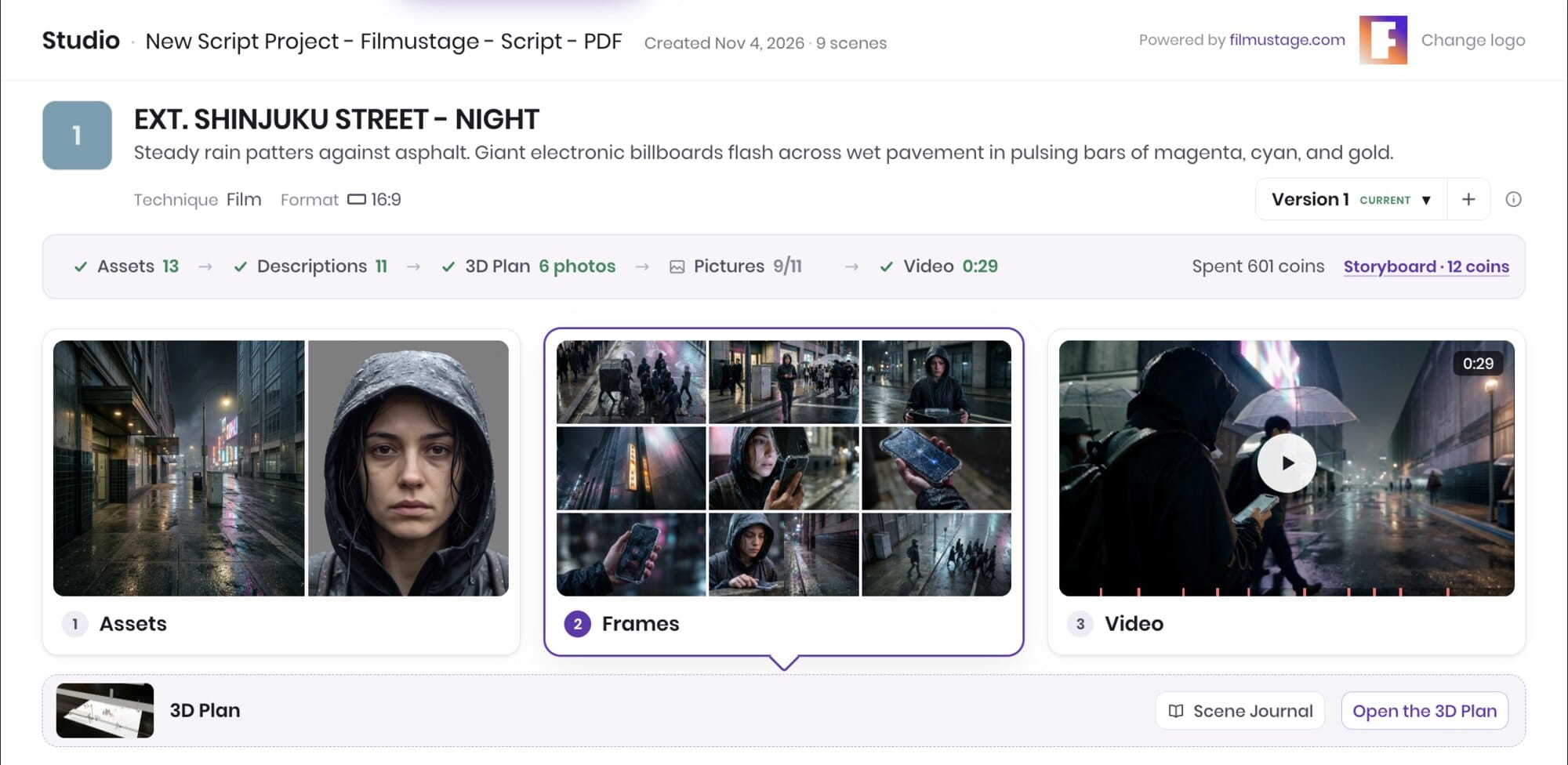
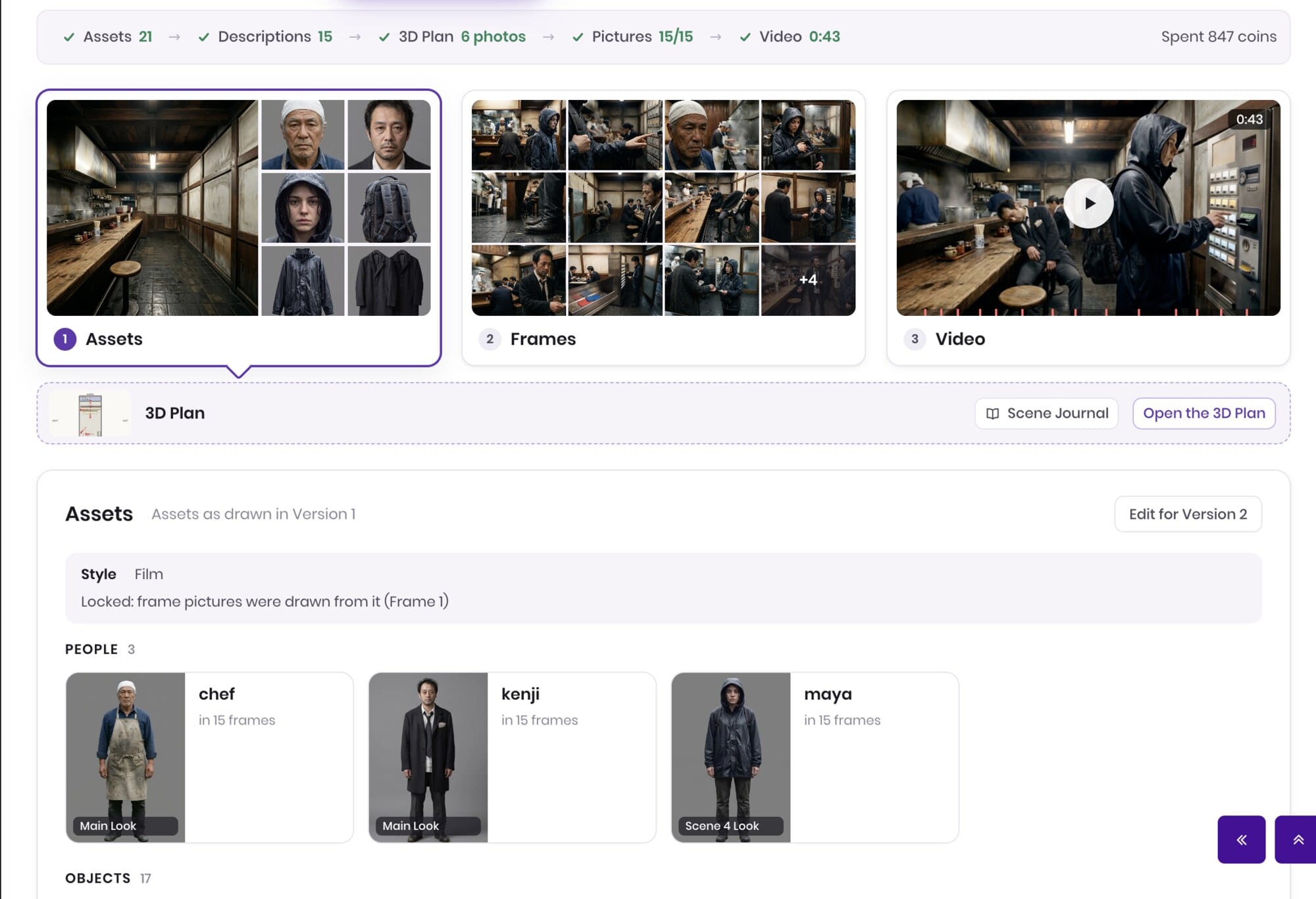
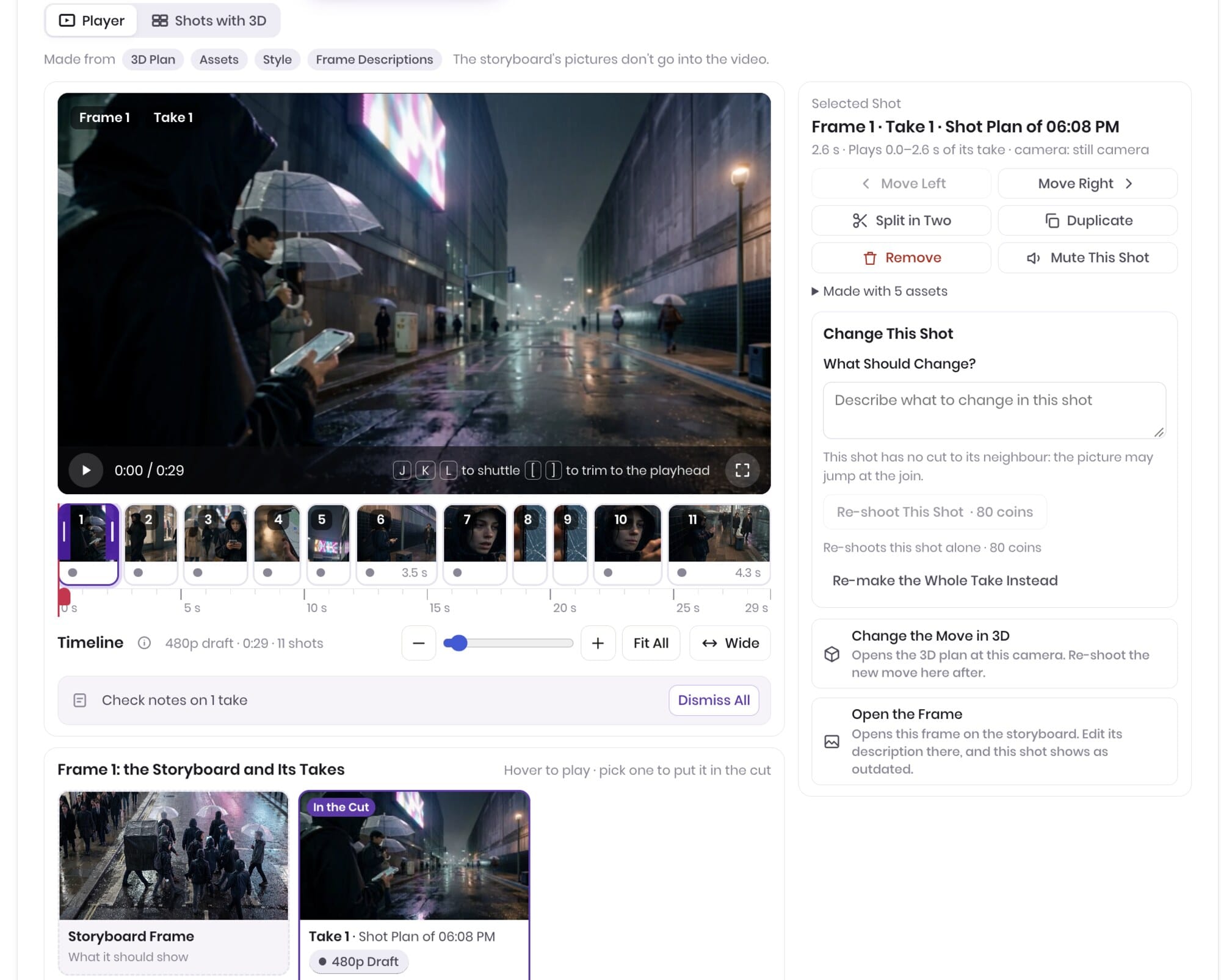
The full scene, 29 seconds, straight out of the editor.
If you then shoot the scene for real, nothing is wasted: the same scenes feed the stripboard, the DOOD, the call sheets and the budget, because Filmustage Studio lives inside the same project as the rest of Filmustage.
Who it is for
Studios hand previs to specialists. Filmustage Studio is for everyone who never had a previs department and wants both halves of the job, the creative and the technical: agencies rendering a 30-second spot for the client before the bid; music video directors pitching with the video instead of a treatment PDF; vertical drama and episodic teams who need the same kitchen and the same lead in episode 1 and episode 40; indie filmmakers who want to watch the short before they borrow the camera; animation and anime creators tired of model drift; course creators and channels who want to be in every video without filming themselves.
What comes next
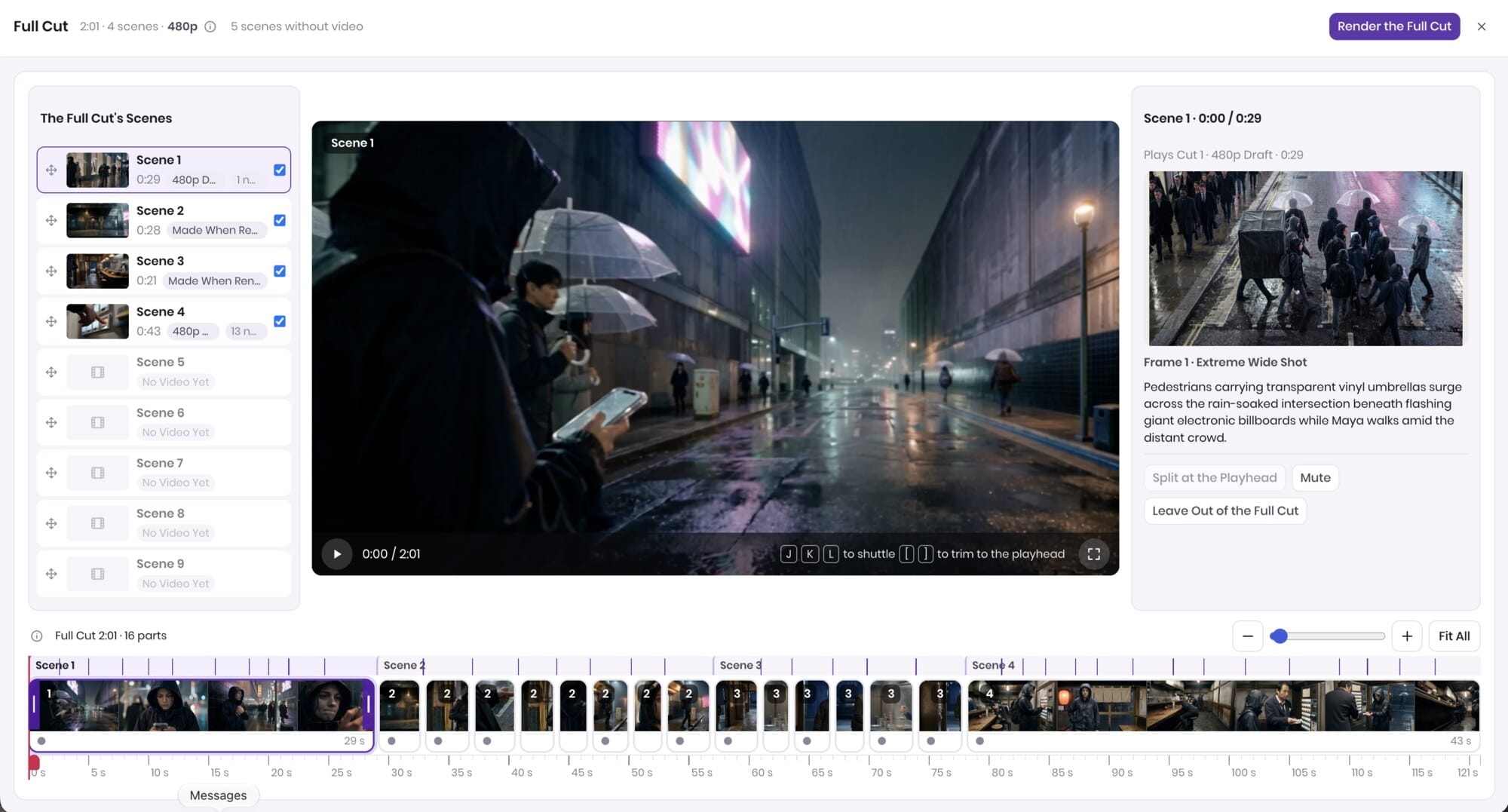
Everything above is a single scene. The Full Cut view already stitches every scene that has video into one timeline, in script order, and renders it as one file. In our test that is four scenes, two minutes and sixteen parts, with the five scenes that have no video yet waiting as placeholders. Scene continuity across the whole script, the Direction panel, and what else we are preparing for the official release will get their own article.
FAQ
What is Filmustage Studio? A script-to-video tool inside Filmustage. It breaks a script into scenes, turns the breakdown into assets, builds a 3D set per scene with cameras and lights, renders storyboard frames from those cameras, and generates the scene video shot by shot from the same plan, so characters, locations and light stay consistent across every shot.
Do I need to know 3D or Blender? No. The 3D plan is generated for every scene with the set, actors, cameras and light already placed. You can open it and move anything; nothing requires you to.
How is this different from Runway, Kling or Veo? Those are video models; Filmustage Studio uses models like them for the final render. The difference is everything before the render: the breakdown, the assets, the 3D set and the camera plan that make shot seven match shot one.
How do you keep a character consistent across scenes? The character is an asset with a fixed face, build and wardrobe, placed into each scene’s 3D set and seen by every camera. Consistency is a property of the set, not a lucky prompt.
Can it look like my real actor and my real location? Yes. Upload photos and they become assets. You can cast yourself.
How long can a scene or a film be? There is no fixed limit; video is generated shot by shot and assembled per scene, so length follows the script.
Is this previs or a finished film? Both. Render it rough to plan a live shoot, or finished for an ad, a music video, an animated episode or a vertical drama.
What happens to my script? It is never used to train or fine-tune models, on any plan. Filmustage is SOC 2 Type II audited and holds TPN Blue status; how Filmustage protects an unreleased script has the details.security post has the details.
Is Filmustage Studio available now? It is in beta with a selected group of users; there is no public release date yet. Join the waitlist at the end of this article and we will open it on your account in one of the next groups.
Try it
Filmustage Studio is in beta with a selected group of users, and there is no public release date yet. Join the waitlist below and we will open it on your account in one of the next groups.
New to Filmustage? Start free with the breakdown and the storyboard today; Filmustage Studio opens on the same project.
From Breakdown to Budget in Clicks
Save time, cut costs, and let Filmustage's AI handle the heavy lifting - all in a single day.